Iris
Iris helps labs send files to SoloDB safely and consistently. It takes uploads from lab systems, keeps them in a temporary holding area, and lets a workstation confirm what should be stored.
Overview
Iris middleware for uploads from a lab client to SoloDB with a solodb-workstation or other client as intermediary. The lab initiates uploads and sends file data. Iris stores the data temporarily, streams upload events over SSE to the workstation, and uploads approved files to SoloDB.
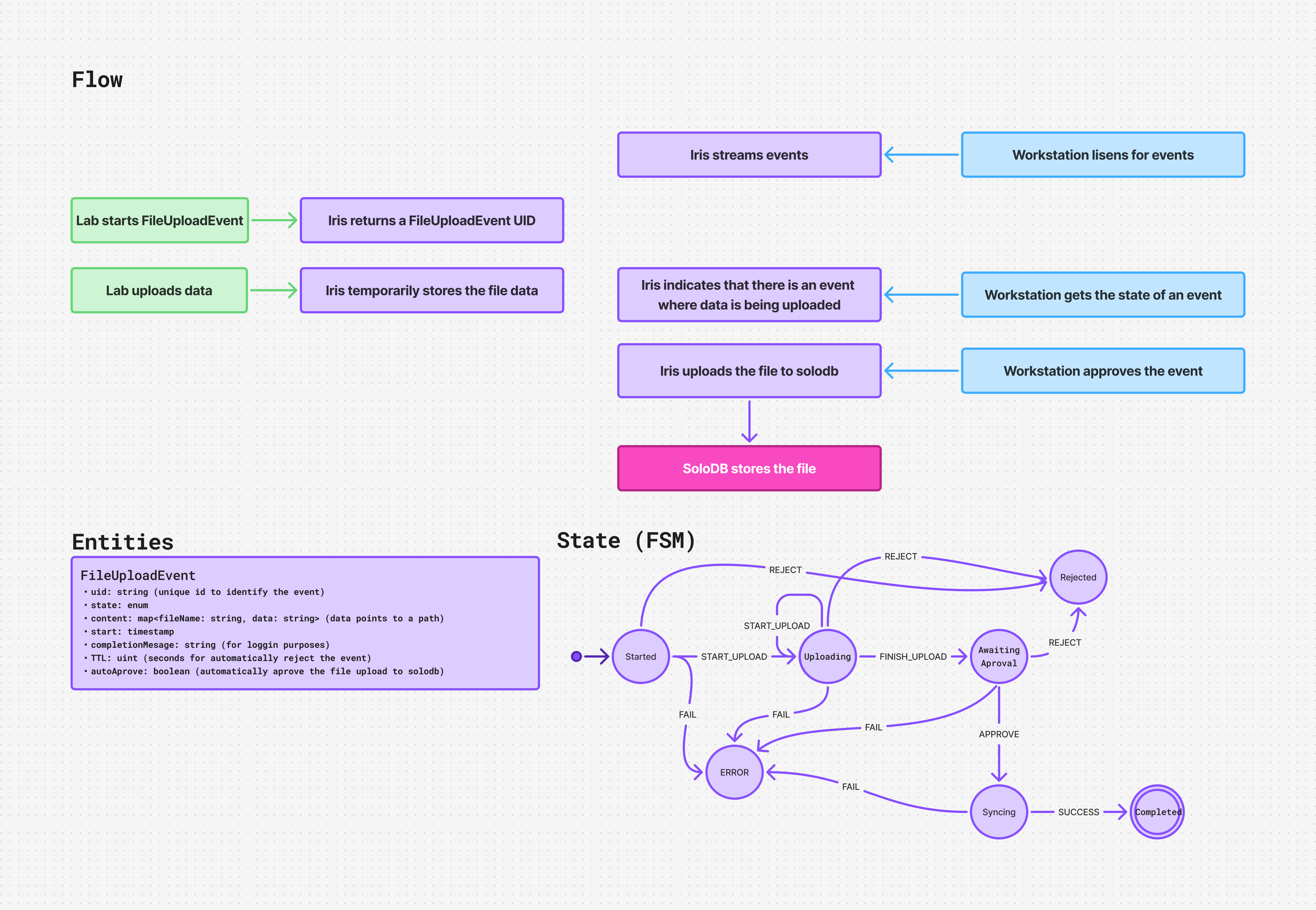
The flow, entity fields, and state transitions are illustrated below.
API
[CENSORED]
Entities
FileUploadEvent
uid: string identifier for the event.state: enum state for the event lifecycle.content: map offilenametodata(data points to a path).start: timestamp when the upload started.completedState: string for logging purposes.TTL: uint seconds before the event is automatically rejected.autoApprove: boolean to automatically approve uploads to SoloDB.
State (FSM)
FileUploadEvent follows this finite state machine:
started--START_UPLOAD-->uploadingstarted--REJECT-->rejectedstarted--FAIL-->erroruploading--FINISH_UPLOAD-->awaiting_approvaluploading--REJECT-->rejecteduploading--START_UPLOAD-->uploadinguploading--FAIL-->errorawaiting_approval--APPROVE-->syncingawaiting_approval--REJECT-->rejectedawaiting_approval--FAIL-->errorsyncing--SUCCESS-->completedsyncing--FAIL-->error
Flow
- 1The lab starts an upload and Iris returns a
FileUploadEventUID. - 2The lab uploads file data and Iris stores it temporarily.
- 3Iris streams upload events and the workstation listens for updates.
- 4Iris indicates that data is being uploaded and the workstation checks the event status.
- 5The workstation approves the event.
- 6Iris uploads the file to SoloDB and storage completes.